
The home dashboard
What the tiles and charts on Home show, and which numbers follow the date range.
User guide
What the tiles and charts on Home show, and which numbers follow the date range.
Home is the first page you see. It shows what needs your attention now and how the chosen period is going. Each part appears only for staff whose role can see its data.
Who can do this: everyone who signs in sees Home. A tile or chart appears only if your role can view the data behind it, for example orders or returns.
At the top left, Home shows which store you are looking at, or All stores. Pick a store in the store selector to see one store. The date control and the refresh button are at the top right.
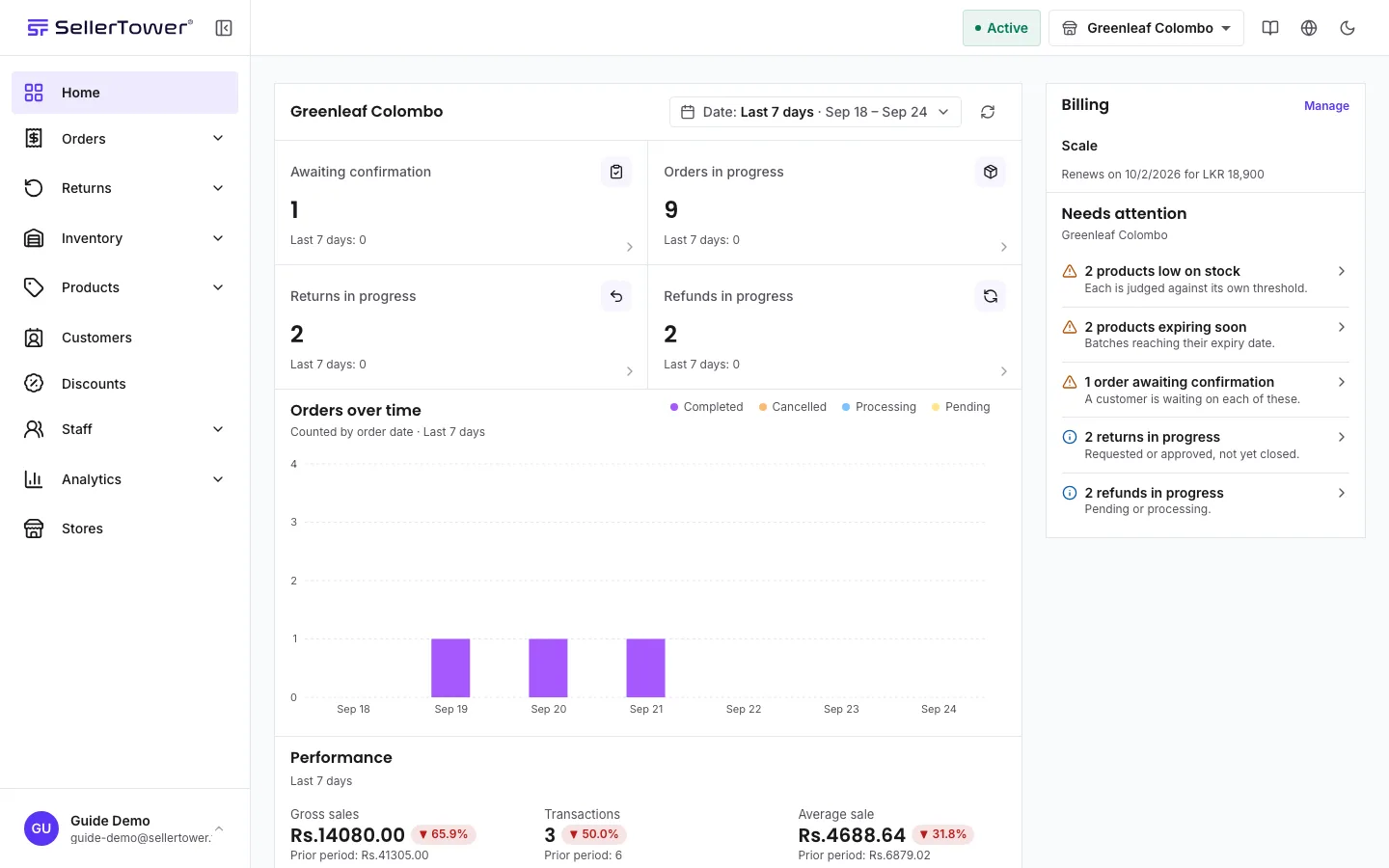
The tiles. Each tile opens the page where you deal with it.
| Tile | What it counts |
|---|---|
| Awaiting confirmation | Orders waiting for you to accept (Pending). |
| Orders in progress | Orders that are Confirmed or Processing. |
| Returns in progress | Returns that are requested or approved. |
| Refunds in progress | Refunds that are pending or processing. |
| Low stock items | Products at or below their own low stock level. Shown when the store tracks stock. |
| Expiring products | Products with a batch that expires in the next 90 days. Shown when the store has dated batches. |
| Committed orders due | Pre-orders and customized orders that are overdue or due in the next 30 days. Shown when the store sells such products. |
Orders over time. Every order placed in the period, as stacked bars: Completed, Cancelled, Processing (Confirmed and Processing together) and Pending. It is counted by the date each order was placed.
Performance. Gross sales, Transactions and Average sale, then Net sales as a line chart against the period before. Each figure has a change pill against the period before.
Below these, Home lists the store's low stock, expiring and due orders. On a wide screen, a column on the right shows your billing, anything that Needs attention, and links to guides.
With All stores selected, the tiles and the lists step aside, because the pages they open work one store at a time. Instead you see:
Home mixes two kinds of numbers on purpose.
The first four tiles show both: the count in the chosen dates over the all-time total. Hover over the total to read "In the selected dates, over the all-time total".
| Symptom | Cause | Fix |
|---|---|---|
| The tiles are gone. | All stores is selected. | Pick one store. |
| A tile you expect is missing. | Your role cannot see its data, or the store has nothing it could count (for example no dated batches). | Ask for the permission, or check the store's products. |
| The change pills are missing. | The period before had nothing to compare with, stores in different currencies are mixed, or your plan does not include comparison. | Narrow to one store, pick another range, or check your plan. |
| Net sales is lower than the order count suggests. | Money counts completed orders only. | See Metric definitions. |
Metric definitions · The metrics pages · Date ranges & plan history