
Store statuses & deletion
Disabling, archiving and deleting a store, and why disabling is the safe choice.
User guide
Disabling, archiving and deleting a store, and why disabling is the safe choice.
A store that is not open for business is in one of three states. They are different: Disabled is your own switch. Archived is set by SellerTower. Deleting is permanent.
Who can do this:
You find all of these in the store's row menu on the Stores page. On a phone, swipe the row to the left, or press and hold it.
| Status | Who sets it | Can the store trade? | Can it come back? |
|---|---|---|---|
| Active | You | Yes | Not needed |
| Disabled | You | No | Yes, when you enable it |
| Archived | SellerTower, when your plan no longer covers the store | No | Yes, when a plan covers it again |
| Deleting | You, by deleting the store | No | No |
The box says: "This store will stop accepting orders, returns, refunds and stock changes. Everything it already holds stays visible, and you can enable it again at any time."
The store's seat is free again straight away. This does not lower your bill by itself. See Seats & add-ons.
While a store is disabled, any change to it is refused with "store is disabled". You can still read all its history.
The store starts accepting orders, returns, refunds and stock changes again. It needs a free seat. If you have none, the box tells you, and the store stays off until you buy a seat or free one.
If your plan changes and no longer covers all your stores, SellerTower can archive the extra ones after a grace period. An archived store is read-only. You cannot edit, enable or delete it. It comes back when a plan covers it again. Nothing in it is lost.
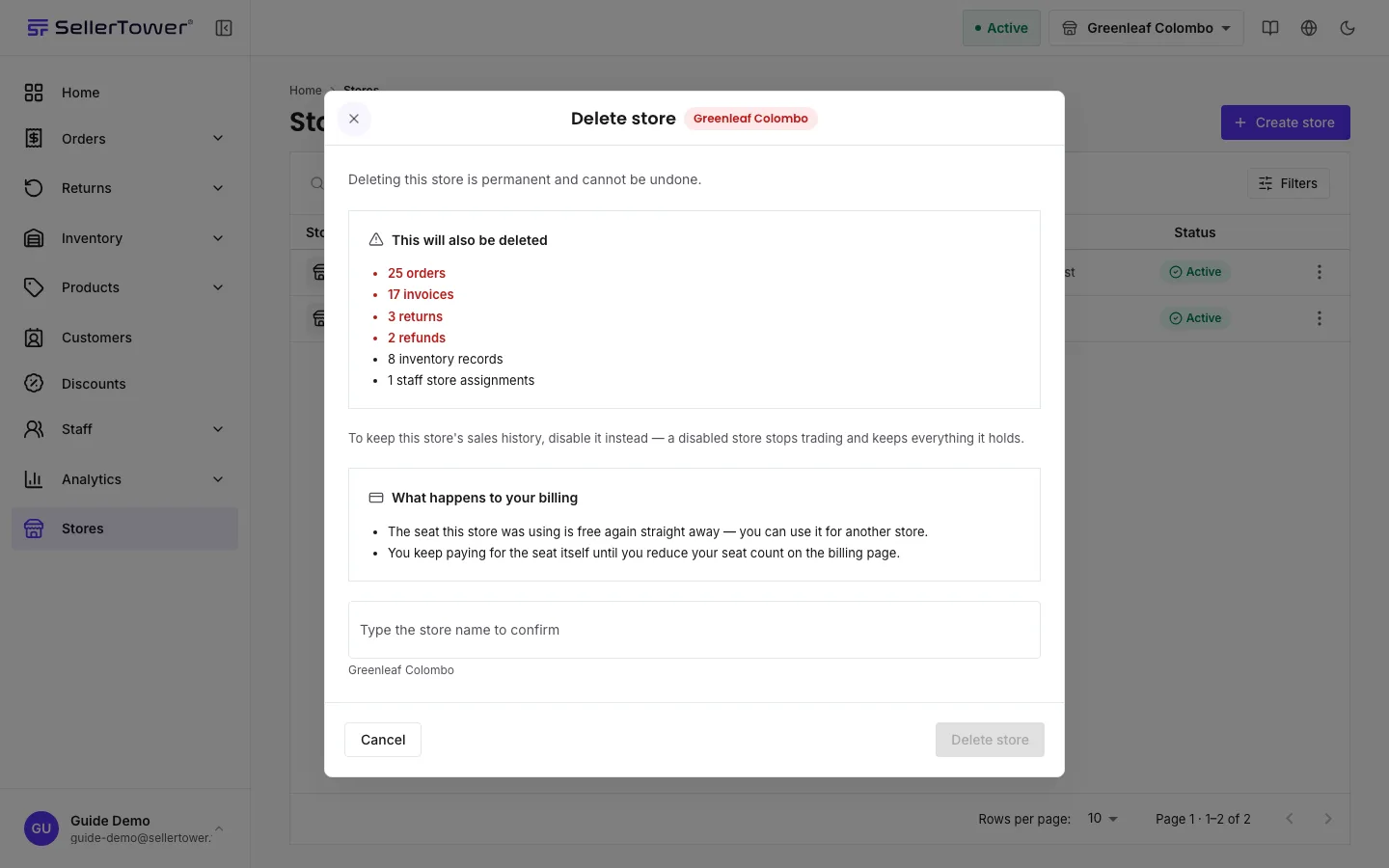
The box warns: "Deleting this store is permanent and cannot be undone."
What else happens:
The Delete option is turned off for a store that is archived or already being deleted.
You also cannot delete your last open store. A business must always keep at least one store it can trade from. Disabled and archived stores do not count as open. So if every other store is disabled or archived, this store cannot be deleted. The box then offers Deactivate instead.
| You see | Why | What to do |
|---|---|---|
| "store is disabled" | You tried to change something in a disabled store. | Enable the store, or choose another store. |
| "store is archived" or "resource archived by plan limit" | The store was archived because your plan does not cover it. | Move to a plan that covers it. |
| "This store cannot be deleted" | It is your last open store. | Keep it, or open another store first. Use Deactivate instead if you only want it to stop trading. |
| "Could not check this store. Try again before deleting anything." | The check before deleting failed. | Close the box and try again. |