
Low stock & out of stock
Where the low stock level comes from, and what the Low stock warning and Out of stock tabs show.
User guide
Where the low stock level comes from, and what the Low stock warning and Out of stock tabs show.
The Low stock warning and Out of stock tabs on the inventory list are your restocking list. They never overlap. "Low" means running out, not out. A product is low when its available stock is above zero but at or below its low stock level. It is out when it is at zero.
Who can do this: anyone who can view inventory sees the tabs. Setting a product's low stock level needs permission to edit products.
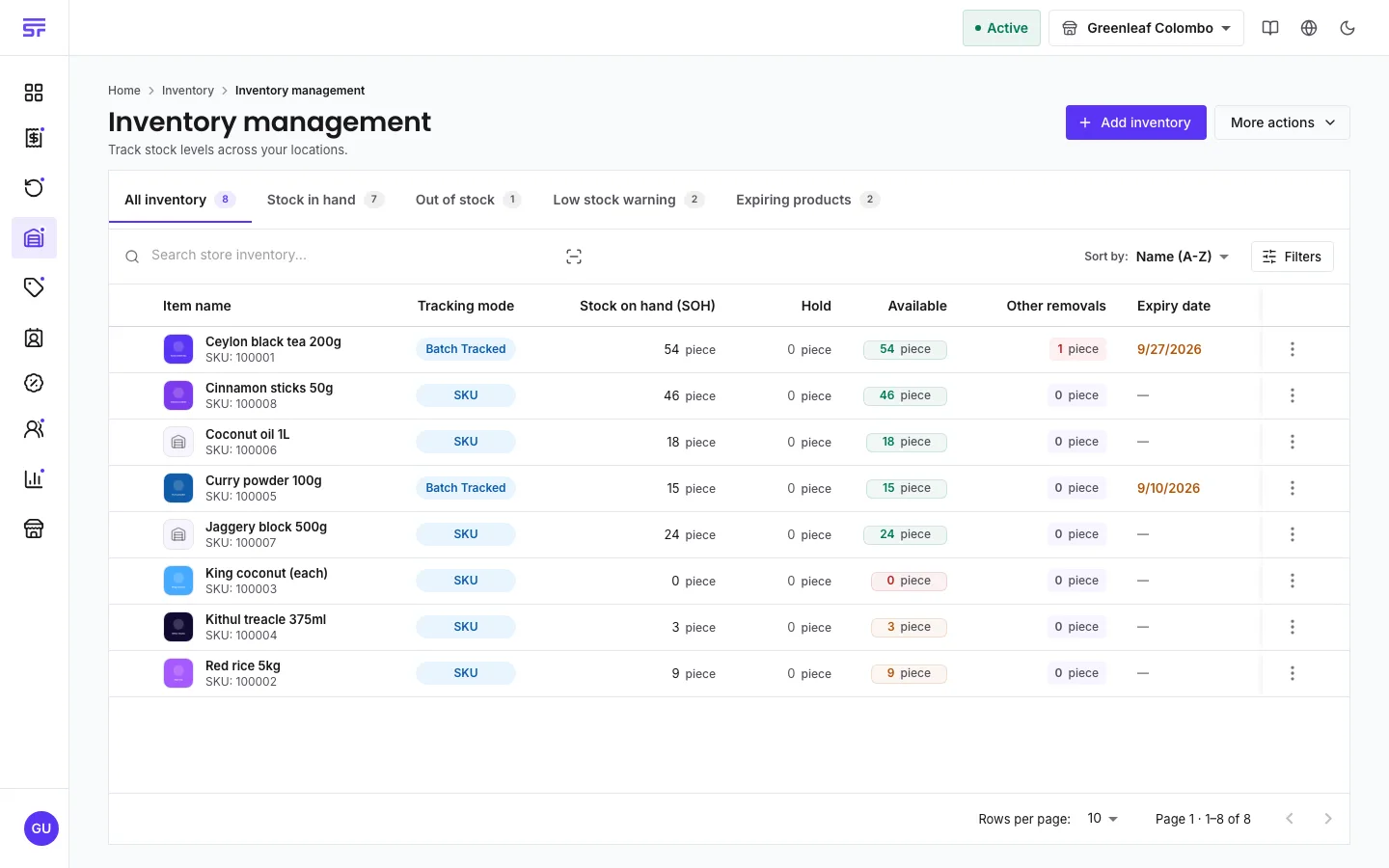
The home dashboard also shows a low stock band that links to these products. See The home dashboard.
The level is worked out per product, in this order:
A level of 0 means "never warn me about this product". That is different from leaving the field empty, which means "use the store default". See the field reference.
| Symptom | Cause | Fix |
|---|---|---|
| A product at zero is not in Low stock warning. | Zero is out of stock, not low. | Look in Out of stock. |
| A product is never flagged low. | Its Low stock below is 0, or it does not track stock. | Set a level above 0, or turn on Track inventory. |
| A product sold by weight is flagged too early. | The level is in its own unit, for example kilograms, not pieces. | Set the level in that unit. |
Product fields reference · Adjusting stock · The home dashboard